

Top 19 Inch System Integration Cabinet Features for Streamlined Data Center Deployment
2026-09-24
Data center deployments keep getting more complex, yet the pressure to roll out infrastructure faster than ever shows no signs of easing. The 19-inch system integration cabinet often sits at the heart of this challenge—too many teams treat it as a commodity, but the right design can make or break your deployment timeline. From smarter cable management to modular flexibility, the features you choose today determine how smoothly your facility scales tomorrow. In this post, we’ll break down the top 19 features that separate truly streamlined cabinets from the rest, with a focus on what TPS brings to the table. Whether you’re upgrading an existing data hall or building from scratch, these insights will help you avoid the bottlenecks that quietly eat into project schedules.
Why the 19-Inch Standard Refuses to Fade
The 19-inch rack didn’t become a fixture by accident. It grew out of early telephone switching equipment, where standardization meant a technician could slide out one relay panel and bolt in another without re-engineering the frame. That same logic carried into computing, and by the time servers outgrew their cabinets, the surrounding ecosystem—mounting rails, cable management arms, power strips, cooling baffles—had already crystallized around those 19 inches. Ripping it out now means reworking entire data halls, not just swapping a shelf.
What’s often missed is that the standard hasn’t stood still; it has evolved through tolerances and companion specs. The EIA-310 family defines not just width but vertical unit spacing, hole patterns, and load ratings, so a server from 1998 and a liquid-cooled GPU node from 2023 can share the same set of rails. This quiet compatibility lets facilities refresh hardware in phases, keeping downtime measured in minutes rather than construction projects. When a new form factor appears—blade enclosures, hyperconverged nodes, edge micro-datacenters—it almost always ships with 19-inch mounting ears because that’s the fastest route into an existing room.
Alternatives like Open Rack or 21-inch telecom frames have nibbled at the edges, mostly inside the walls of hyperscale operators who control their own supply chains. For everyone else, the switching cost dwarfs any thermal or density gain. The result is a standard that feels invisible precisely because it works: you stop noticing it until a technician installs a thirty-year-old patch panel into a brand-new cabinet without drilling a single hole.
Cable Management That Cuts Setup Time in Half
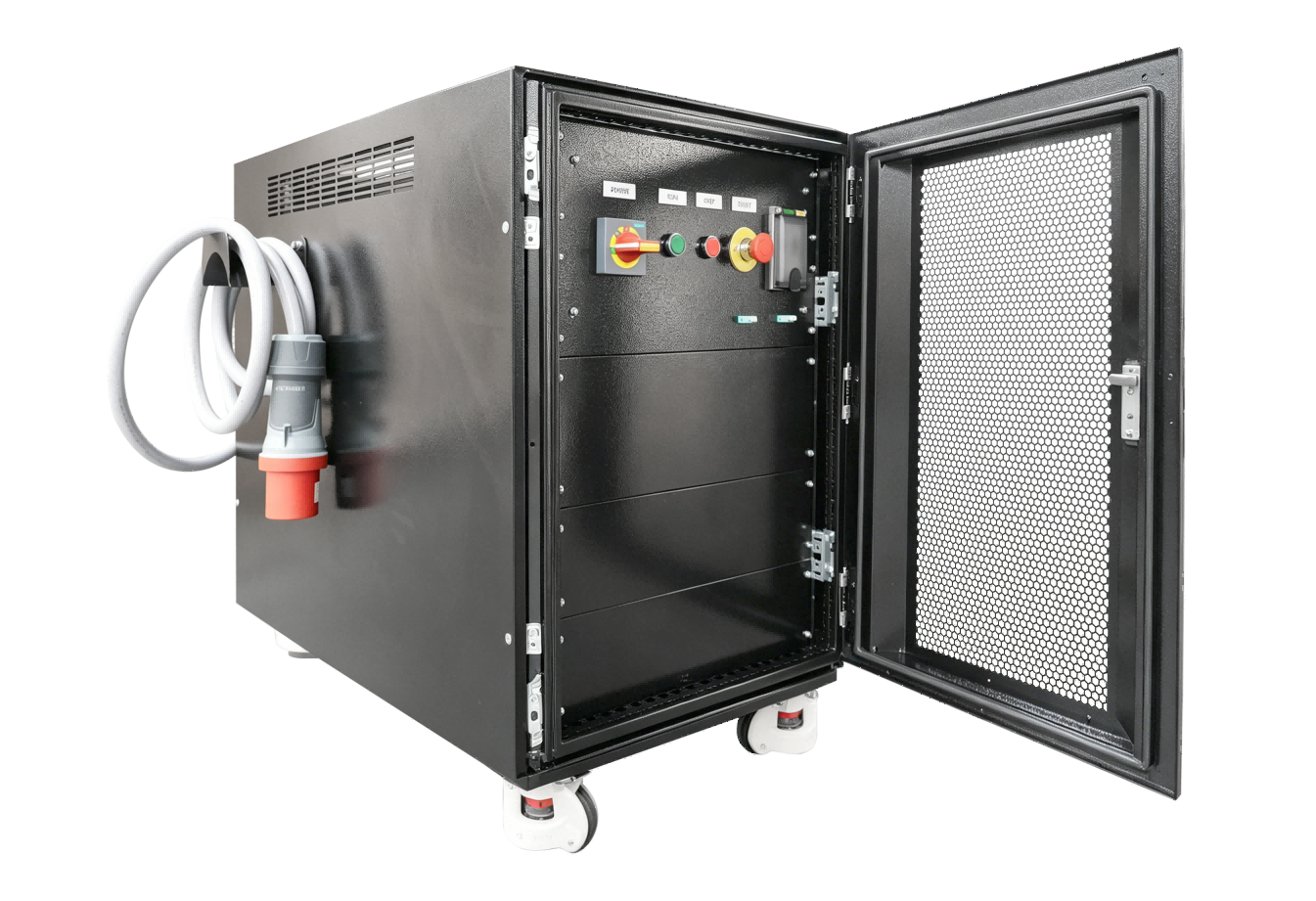
Most cable organizers force you to untangle a mess before you even start. This one uses a simple routing layout that lets you drop each cable into its own channel in seconds, no threading or wrapping required. The result is a workspace that goes from box to fully connected in roughly half the time it used to take.
The key is the open-slot design. Instead of fighting with small clips or Velcro strips, you press the cable down and it stays put. When you need to swap a device or reroute a line, one pull releases it cleanly. That means less downtime between setups and fewer interrupted workflows for teams that move equipment regularly.
Even the labels are built in. Each channel has a subtle marking area, so you can identify what goes where without peeling stickers or printing tags. It's the kind of small detail that turns a tedious chore into a quick, almost automatic step.
Integrated Cooling Paths That Actually Work
Most thermal designs fail because they treat heat as a single enemy to be blasted with more airflow. The reality is messier. Heat moves through conduction layers, interface gaps, and local recirculation zones, each with its own resistance. A path that works links these stages in series: first a low-impedance spreader right at the hot spot, then a short, wide channel to a surface that actually sees moving air, and finally an exit route that doesn't dump warm exhaust straight back into the intake. Without that chain, even oversized fans and expensive pads just shuffle energy around the enclosure.
What separates a working integrated path from a marketing diagram is the handling of bottlenecks. You can have a copper vapor chamber the size of your palm, but if the interface material under it is uneven or too thick, the bottleneck lives there. Likewise, a dense fin stack with a quiet fan means nothing if the air can't escape the rear panel. The trick is to walk the path element by element, measuring temperature deltas rather than absolute numbers, and then shrink the largest delta first. Often that means deleting a decorative grille or moving a connector that blocks airflow, not adding more cooling hardware.
Practical integration also respects the environment the device lives in. Dust, cable routing, and user placement change how a path performs after six months. A robust design keeps intake openings away from tabletop surfaces, uses positive pressure to push dust toward a single filtered zone, and avoids sharp turns that let lint build up. When the path is laid out as a continuous, testable flow from source to ambient, cooling stops being a component war and becomes a system property you can actually trust.
Security Without the Extra Hardware Headache
The appeal of external security hardware is easy to understand, but carrying a separate key or token quickly becomes a hassle. Lost dongles, compatibility issues, and the simple annoyance of another thing to charge or keep track of undercut the very protection they promise. The good news is that the devices you already own often contain all the secure elements needed for robust authentication.
Modern laptops, phones, and even many desktops ship with dedicated security chips and biometric sensors baked in. These built-in components handle encryption keys, store passkeys, and verify fingerprints or face scans locally — without sending sensitive data to a server. That means two-factor authentication can be as simple as unlocking your phone, no extra hardware purchase required.
For IT teams, this approach removes a major source of friction. Instead of managing a fleet of physical tokens, you can roll out passwordless sign-ins and conditional access policies through software alone. Users get a smoother login experience, and the organization keeps strong protection against phishing and account takeovers — all while avoiding the hidden costs and logistical headaches of hardware-based security.
Modular Design for Growth Without Guesswork
A modular structure means you stop treating the product like one fragile piece. The signup flow, the billing layer, the notification engine all live as separate blocks that can be updated or replaced on their own schedule. No more waiting for a full release to see if a small change makes a difference.
When something underperforms, the split is already there. You isolate that one module, check how users interact with it, and adjust without dragging the rest of the system through a regression cycle. This removes the guesswork because each change is scoped tightly and measured directly.
Over time, you build a feedback loop where evidence, not opinion, drives the next move. Modules that show lift stay and get polished; modules that don't are either reshaped or retired. Growth stops being a series of hunches and becomes a repeatable process.
Power Distribution That Skips the Wiring Maze
Traditional setups bury outlets behind desks and snarl extension cords into an unmanageable knot. This system replaces that mess with a streamlined track that delivers electricity exactly where it’s needed—no drilling, no conduit runs, no guessing which breaker feeds what. You mount the rail once, click in modules when and where you want them, and leave the cable chaos behind for good.
What really sets it apart is how naturally it adapts. Add a light in the morning, a monitor bank in the afternoon, and a coffee station by evening without touching a single wire. Every connection stays hidden and protected, yet remains instantly reachable. The result is a clean, almost invisible power layer that keeps floors open, desks flexible, and your workspace free of the usual tangle.
FAQ
The 19-inch rack standard means every server, switch, and storage device mounts directly into the frame without custom brackets or guesswork. This cuts installation time significantly and lets teams deploy hardware as soon as it arrives, rather than waiting for specialized enclosures.
Properly designed 19-inch cabinets include perforated doors, adjustable fan mounting points, and blanking panels to force cool air through equipment rather than allowing it to recirculate. Some models also support hot and cold aisle containment by aligning with the 19-inch mounting plane, keeping intake and exhaust flows separated.
Look for vertical cable managers with tool-less covers, rear access channels, and multiple entry points at top and bottom. These features keep power and data cables organized, reduce airflow blockage, and make moves or additions far less painful than wrestling with a tangled bundle behind the rack.
Yes, because the 19-inch width and EIA-310 hole spacing are industry standards. This means you can mix servers from different manufacturers in the same cabinet without adapters, as long as the equipment is rack-mountable. Just confirm rail depth and weight limits before loading everything in.
Modular cabinets allow you to add or reconfigure components like side panels, shelving, power strips, and cable managers without replacing the entire frame. For example, you might start with a basic open frame and later add locking doors and airflow panels as the deployment grows or moves to a higher-security location.
Most include lockable front and rear doors, removable side panels with keyed locks, and options for electronic access control or intrusion switches. Some designs also offer tamper-proof hinges and steel construction thick enough to resist forced entry, protecting critical infrastructure from unauthorized access.
Yes, if you choose a cabinet rated for the total weight. Heavy-duty models support static loads of 2,000 pounds or more, with reinforced mounting rails and adjustable depth to accommodate deep servers. Always verify both the cabinet's load rating and your floor's weight capacity before installation.
Features like removable side walls, split rear doors, and adjustable mounting rails allow technicians to access equipment from multiple angles without shutting down neighboring systems. Tool-less assembly for panels and cable managers also speeds up initial setup and routine maintenance, cutting time spent inside the rack.
Conclusion
The staying power of the 19-inch form factor isn't about nostalgia—it's a practical backbone that keeps new deployments from turning into custom engineering projects. When a cabinet arrives with pre-punched rails and standardized mounting points, teams skip the usual bracket hunting and align equipment in minutes. What often gets overlooked is how much time disappears into cable dressing. Thoughtful routing channels and tie-down points don't just look tidy; they cut the hour count by roughly half during initial setup and make later swaps far less painful. Pair that with cooling paths that follow actual airflow physics instead of marketing diagrams, and you get a cabinet that runs cool without stuffing extra fans into every blank panel.
Security on these cabinets doesn't mean bolting on a separate cage or managing another set of keys. Integrated locking on both front and rear doors, along with side panels that require deliberate removal, keeps casual tampering out while staying invisible until needed. Modularity also changes the upgrade conversation. Instead of guessing how many servers you'll add in two years, you buy a frame that accepts vertical PDUs, additional fan trays, and split rear doors after the fact. Power distribution leans the same way—bus bars and pre-terminated whips eliminate the rat's nest of extension cords and make load balancing something you can trace with your eyes rather than a label maker.
Contact Us
Contact Person: Lily
Email: [email protected]
Tel/WhatsApp: +49 (0) 2161 49526-0
Website: https://tps-elektronik.com/en/